> ## Documentation Index
> Fetch the complete documentation index at: https://docs.usetusk.ai/llms.txt
> Use this file to discover all available pages before exploring further.
# Customization
> Customize the testing agent to your repos
## Overview
Tusk allows you to provide custom instructions to the testing agent to meet your **testing guidelines** on a per repo basis.
Although Tusk by default explores your codebase at runtime to adhere to your testing best practices, providing custom instructions ensures Tusk is aware of specific symbols to test, preferred testing patterns, etc.
## How to Customize
1. After a test check is enabled for your repo, go to the **Repositories** page and click on the gear icon.
2. Click on the **Customization** tab.
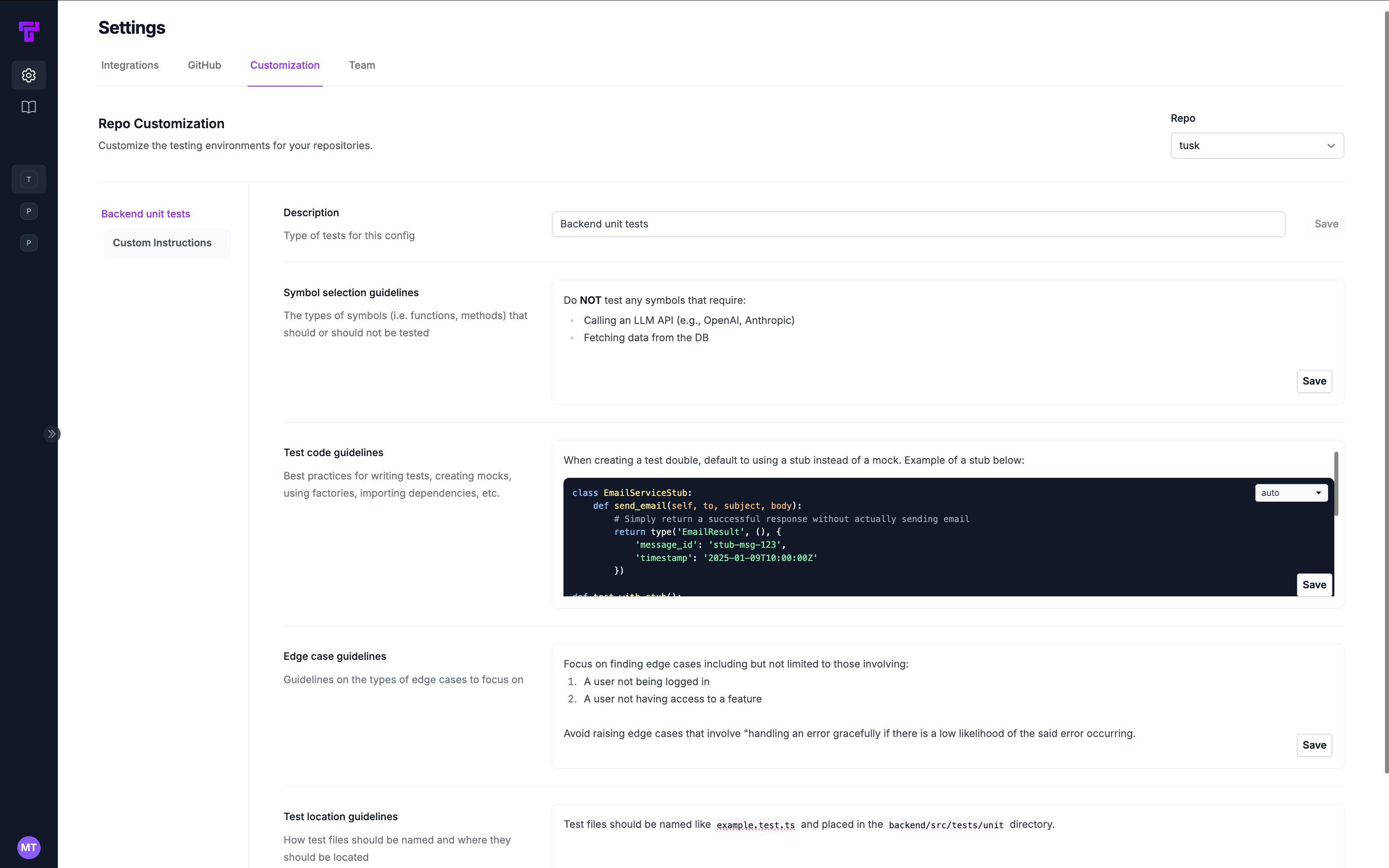 3. Select the repo for which you want to modify custom instructions by using the **Repo** field in the top right corner.
4. On the left, select the **testing environment** you want to customize.
5. You will see a list of fields that you can customize below.
* **Symbol selection guidelines**: Types of symbols (i.e., functions, methods) that should or should NOT be tested.
* **Test code guidelines**: Best practices for writing tests, creating mocks, using factories, importing dependencies, etc.
* **Edge case guidelines**: Notes on the types of edge cases to focus on finding
* **Test location guidelines**: Naming conventions for test files and where they should be placed in the repo
6. Click the **Save** button after editing each section.
7. Tusk will now use these custom instructions to generate tests for the repo.
Editors support markdown formatting and "@" mentions for file references.
## Common Customization Examples
Use these examples as starting points. Copy, paste, and adapt them in the **Customization** tab.
If you have docs, `.cursor/rules`, or `CLAUDE.md` files, you can "@" mention relevant files in the customization.
### Symbol Selection Guidelines
By default, Tusk selects the most relevant symbols in your PR/MR to test. Influence this by customizing which symbols to test.
Customize this based on your repository's external dependencies.
```
**Do NOT generate tests for symbols that:**
- Call Large Language Models (OpenAI, Anthropic, etc.)
- Use third-party APIs that are difficult to mock
- Need authentication with external services
- Depend on hardware-specific features
**Do generate tests for:**
- Core business logic with minimal dependencies
- Data transformation utilities
- Service layer methods with clear inputs/outputs
```
Customize this based on your repository's directory structure.
```
**Only generate tests for:**
- Code in `src/utils/` directory
- Code in `src/services/` directory
- Code in `src/models/` directory
**Skip testing:**
- Presentation components in `src/components/ui/`
- Configuration files in `src/config/`
- [Add other directories specific to your project (e.g., `src/legacy/`, `temp/generated/`)]
```
```
- Skip testing any scripts (in `src/scripts/`)
- Skip testing pure React components without business logic
- Focus on utility functions, hooks, and services
```
```
- Skip testing `__init__.py` files with only imports
- Skip testing simple dataclass or pydantic model definitions
- Skip testing Flask/FastAPI route handlers that only call other functions
- Focus on testing core business logic and service functions
- Skip simple get/set property methods
```
### Test Code Guidelines
By default, Tusk finds relevant test files in your codebase and uses them as context when generating tests. Providing customization on how you setup/teardown tests, specific test patterns, etc. will help improve the quality and latency of Tusk's test generation.
Adapt this to your repository's database setup. If using a test harness, "@" mention that file.
**Option 1: Live Test Database**
Provide a template example for how to setup/teardown tests for your repository and how to seed data in the database.
````
**Database setup**
- Our service uses a live test database in CI/tests
- Use `[your test harness]` to access the database (e.g., `TestHarness`)
- No need to mock database calls - use real repositories
- Example initialization: `testDb = new [YourTestDbClass](); await testDb.setup();`
- Remember to clean up after tests: `await testDb.teardown();`
Example of how to seed data in the database:
```
import { seedData } from '@/test/utils/seedData';
beforeEach(async () => {
await seedData();
});
# Rest of example...
```
````
**Option 2: Mock Database**
Provide a template example for how to mock database calls.
````
**Database setup**
- Mock repository/ORM calls as there is no live test database
- Focus on testing business logic, not database interactions
Example of how to mock database calls:
```
import { mockRepository } from '@/test/utils/mockRepository';
beforeEach(() => {
mockRepository.mockClear();
});
# Rest of example...
```
````
If you use a specific pattern for mocking external dependencies, provide a template example in addition to general guidelines.
```
**When testing code with external dependencies:**
- Mock all database calls
- Mock all network requests
- Mock file system operations
- Use dependency injection to provide mocks
- Prefer interface-based mocking over implementation details
```
Customize this based on your repository's testing framework.
```
**Test structure best practices:**
- One logical assertion per test
- Group related tests together
- Use descriptive test names that explain what's being tested
- Use the pattern: `[what is being tested]_[under what conditions]_[expected result]`
- Example: `parse_json_input_with_missing_fields_should_return_error`
**Setup/teardown:**
- Use `[your framework's setup mechanism (e.g., Jest's `beforeEach()`, Pytest's `conftest.py` fixtures, Go's `TestMain()`, etc.)]` for common setup
- Restore all mocks after each test
- Isolate test state between tests
```
```
**For creating test data:**
- Use our factory functions in `[path to your factory files (e.g., tests/factories/ or src/test_utils/data_generators.py)]`
- Example: `createTestUser()` instead of manually constructing users
- Do not insert records directly into test database
- Use factory pattern to ensure proper test isolation
```
```
**For Jest tests:**
- Import test functions from `@jest/globals`
- Use `beforeEach`/`afterEach` for setup/cleanup
- Mock dependencies with `jest.mock()`
- Use spies with `jest.spyOn()` for monitoring function calls
- Always restore mocks in `afterEach` using `jest.restoreAllMocks()`
```
```
**For Pytest tests:**
- Use fixtures for test setup and dependency injection
- Use `@pytest.mark.parametrize` for testing similar scenarios
- Use `monkeypatch` for mocking dependencies
- Use `capsys` for capturing stdout/stderr
- Use `tmpdir` for temporary file operations
```
### Edge Case Guidelines
By default, Tusk will find relevant test cases by looking at business context, usage of the symbol, and the symbol's dependencies. Customization will help Tusk focus on the most important edge cases for your repository.
```
**Always test these edge cases when processing data:**
- Empty collections (arrays, maps, sets)
- Null/undefined/None values
- Maximum/minimum allowed values
- Malformed input data
- Unicode and special characters
- Very large inputs
```
```
**For authentication-related code, test:**
- Invalid credentials
- Expired tokens/sessions
- Missing permissions
- Rate limiting edge cases
- Token refresh scenarios
- Session timeout handling
```
```
**For asynchronous code, test:**
- Race conditions
- Timeout handling
- Partial success scenarios
- Retry logic
- Error propagation
- Cancellation behavior
```
### Test Location Guidelines
By default, Tusk looks at the existing test files in your codebase to determine the best location for new test files.
```
**Test file naming and location:**
- Name test files as `[original_filename].[test|spec].[ext]`
- Place tests in a parallel directory structure to the source
- Example: `src/utils/parser.ts` → `src/utils/parser.test.ts`
- One test file per source file
```
```
- Place test files in `[path to your test directory (e.g., test/ or spec/)]`
- Use naming pattern: `test_[original_filename].[ext]`
- Group related test files in subdirectories
- Keep test data fixtures in `[path to your fixtures directory (e.g., test/fixtures/ or spec/support/fixtures/)]`
```
```
- Create dedicated test file for each function
- Even if source file contains multiple functions
- Use naming like `[functionName].test.[ext]`
- Store in directory structure matching source
- Structure: `tests/[module]/[functionName].test.[ext]`
```
3. Select the repo for which you want to modify custom instructions by using the **Repo** field in the top right corner.
4. On the left, select the **testing environment** you want to customize.
5. You will see a list of fields that you can customize below.
* **Symbol selection guidelines**: Types of symbols (i.e., functions, methods) that should or should NOT be tested.
* **Test code guidelines**: Best practices for writing tests, creating mocks, using factories, importing dependencies, etc.
* **Edge case guidelines**: Notes on the types of edge cases to focus on finding
* **Test location guidelines**: Naming conventions for test files and where they should be placed in the repo
6. Click the **Save** button after editing each section.
7. Tusk will now use these custom instructions to generate tests for the repo.
Editors support markdown formatting and "@" mentions for file references.
## Common Customization Examples
Use these examples as starting points. Copy, paste, and adapt them in the **Customization** tab.
If you have docs, `.cursor/rules`, or `CLAUDE.md` files, you can "@" mention relevant files in the customization.
### Symbol Selection Guidelines
By default, Tusk selects the most relevant symbols in your PR/MR to test. Influence this by customizing which symbols to test.
Customize this based on your repository's external dependencies.
```
**Do NOT generate tests for symbols that:**
- Call Large Language Models (OpenAI, Anthropic, etc.)
- Use third-party APIs that are difficult to mock
- Need authentication with external services
- Depend on hardware-specific features
**Do generate tests for:**
- Core business logic with minimal dependencies
- Data transformation utilities
- Service layer methods with clear inputs/outputs
```
Customize this based on your repository's directory structure.
```
**Only generate tests for:**
- Code in `src/utils/` directory
- Code in `src/services/` directory
- Code in `src/models/` directory
**Skip testing:**
- Presentation components in `src/components/ui/`
- Configuration files in `src/config/`
- [Add other directories specific to your project (e.g., `src/legacy/`, `temp/generated/`)]
```
```
- Skip testing any scripts (in `src/scripts/`)
- Skip testing pure React components without business logic
- Focus on utility functions, hooks, and services
```
```
- Skip testing `__init__.py` files with only imports
- Skip testing simple dataclass or pydantic model definitions
- Skip testing Flask/FastAPI route handlers that only call other functions
- Focus on testing core business logic and service functions
- Skip simple get/set property methods
```
### Test Code Guidelines
By default, Tusk finds relevant test files in your codebase and uses them as context when generating tests. Providing customization on how you setup/teardown tests, specific test patterns, etc. will help improve the quality and latency of Tusk's test generation.
Adapt this to your repository's database setup. If using a test harness, "@" mention that file.
**Option 1: Live Test Database**
Provide a template example for how to setup/teardown tests for your repository and how to seed data in the database.
````
**Database setup**
- Our service uses a live test database in CI/tests
- Use `[your test harness]` to access the database (e.g., `TestHarness`)
- No need to mock database calls - use real repositories
- Example initialization: `testDb = new [YourTestDbClass](); await testDb.setup();`
- Remember to clean up after tests: `await testDb.teardown();`
Example of how to seed data in the database:
```
import { seedData } from '@/test/utils/seedData';
beforeEach(async () => {
await seedData();
});
# Rest of example...
```
````
**Option 2: Mock Database**
Provide a template example for how to mock database calls.
````
**Database setup**
- Mock repository/ORM calls as there is no live test database
- Focus on testing business logic, not database interactions
Example of how to mock database calls:
```
import { mockRepository } from '@/test/utils/mockRepository';
beforeEach(() => {
mockRepository.mockClear();
});
# Rest of example...
```
````
If you use a specific pattern for mocking external dependencies, provide a template example in addition to general guidelines.
```
**When testing code with external dependencies:**
- Mock all database calls
- Mock all network requests
- Mock file system operations
- Use dependency injection to provide mocks
- Prefer interface-based mocking over implementation details
```
Customize this based on your repository's testing framework.
```
**Test structure best practices:**
- One logical assertion per test
- Group related tests together
- Use descriptive test names that explain what's being tested
- Use the pattern: `[what is being tested]_[under what conditions]_[expected result]`
- Example: `parse_json_input_with_missing_fields_should_return_error`
**Setup/teardown:**
- Use `[your framework's setup mechanism (e.g., Jest's `beforeEach()`, Pytest's `conftest.py` fixtures, Go's `TestMain()`, etc.)]` for common setup
- Restore all mocks after each test
- Isolate test state between tests
```
```
**For creating test data:**
- Use our factory functions in `[path to your factory files (e.g., tests/factories/ or src/test_utils/data_generators.py)]`
- Example: `createTestUser()` instead of manually constructing users
- Do not insert records directly into test database
- Use factory pattern to ensure proper test isolation
```
```
**For Jest tests:**
- Import test functions from `@jest/globals`
- Use `beforeEach`/`afterEach` for setup/cleanup
- Mock dependencies with `jest.mock()`
- Use spies with `jest.spyOn()` for monitoring function calls
- Always restore mocks in `afterEach` using `jest.restoreAllMocks()`
```
```
**For Pytest tests:**
- Use fixtures for test setup and dependency injection
- Use `@pytest.mark.parametrize` for testing similar scenarios
- Use `monkeypatch` for mocking dependencies
- Use `capsys` for capturing stdout/stderr
- Use `tmpdir` for temporary file operations
```
### Edge Case Guidelines
By default, Tusk will find relevant test cases by looking at business context, usage of the symbol, and the symbol's dependencies. Customization will help Tusk focus on the most important edge cases for your repository.
```
**Always test these edge cases when processing data:**
- Empty collections (arrays, maps, sets)
- Null/undefined/None values
- Maximum/minimum allowed values
- Malformed input data
- Unicode and special characters
- Very large inputs
```
```
**For authentication-related code, test:**
- Invalid credentials
- Expired tokens/sessions
- Missing permissions
- Rate limiting edge cases
- Token refresh scenarios
- Session timeout handling
```
```
**For asynchronous code, test:**
- Race conditions
- Timeout handling
- Partial success scenarios
- Retry logic
- Error propagation
- Cancellation behavior
```
### Test Location Guidelines
By default, Tusk looks at the existing test files in your codebase to determine the best location for new test files.
```
**Test file naming and location:**
- Name test files as `[original_filename].[test|spec].[ext]`
- Place tests in a parallel directory structure to the source
- Example: `src/utils/parser.ts` → `src/utils/parser.test.ts`
- One test file per source file
```
```
- Place test files in `[path to your test directory (e.g., test/ or spec/)]`
- Use naming pattern: `test_[original_filename].[ext]`
- Group related test files in subdirectories
- Keep test data fixtures in `[path to your fixtures directory (e.g., test/fixtures/ or spec/support/fixtures/)]`
```
```
- Create dedicated test file for each function
- Even if source file contains multiple functions
- Use naming like `[functionName].test.[ext]`
- Store in directory structure matching source
- Structure: `tests/[module]/[functionName].test.[ext]`
```