> ## Documentation Index
> Fetch the complete documentation index at: https://docs.usetusk.ai/llms.txt
> Use this file to discover all available pages before exploring further.
# Developer Experience
> Ideal workflows for using Tusk as a developer
 ## Overview
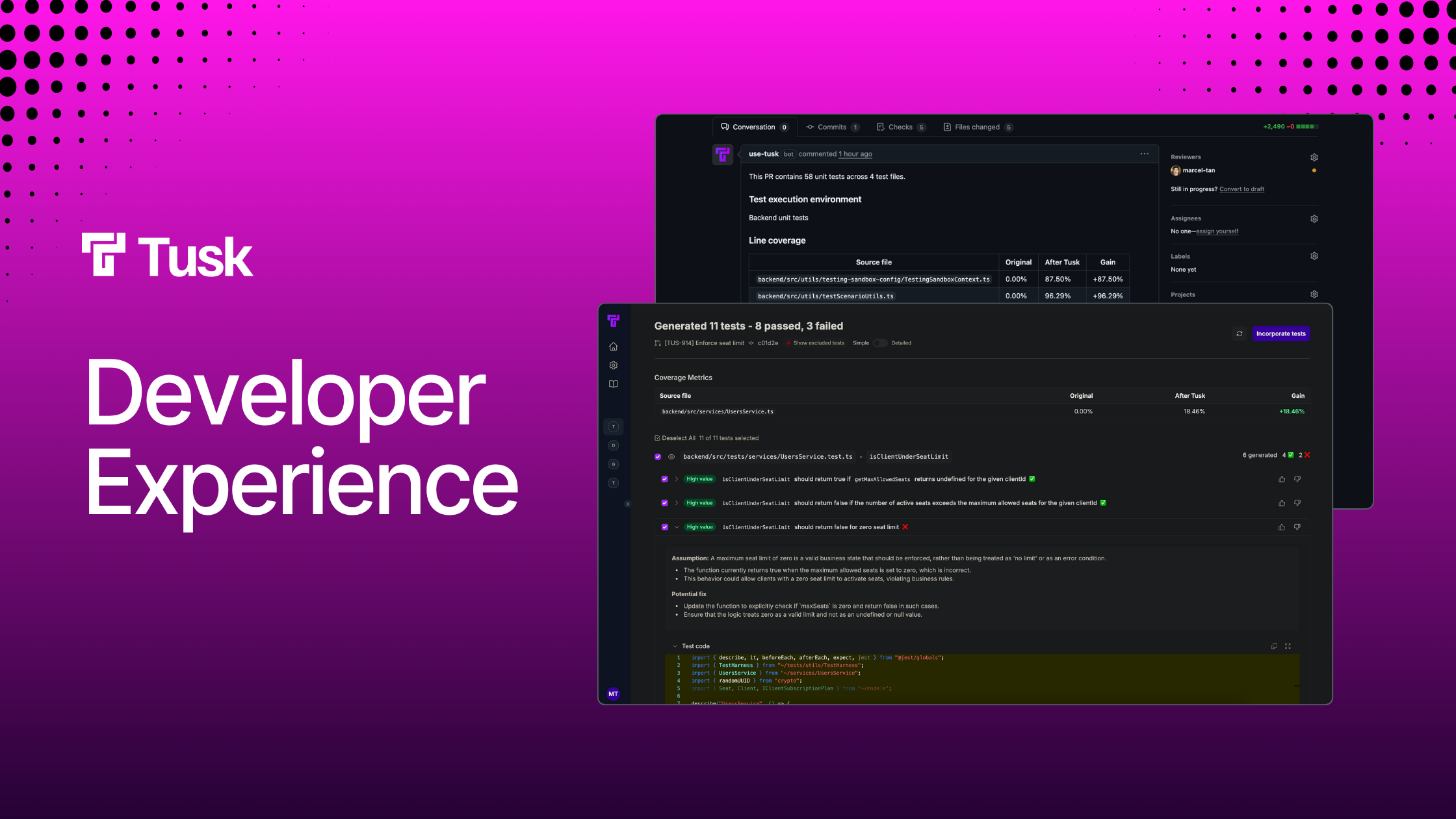
Tusk generates unit tests for your code in 3 main ways:
1. **PR/MR check**, which is triggered when a PR/MR (draft or otherwise) is raised or a new commit is pushed to the PR/MR's branch. This is a non-blocking check by default, akin to AI code review but with the added benefit of scaling your testing infra. [Read more](https://docs.usetusk.ai/automated-tests/overview).
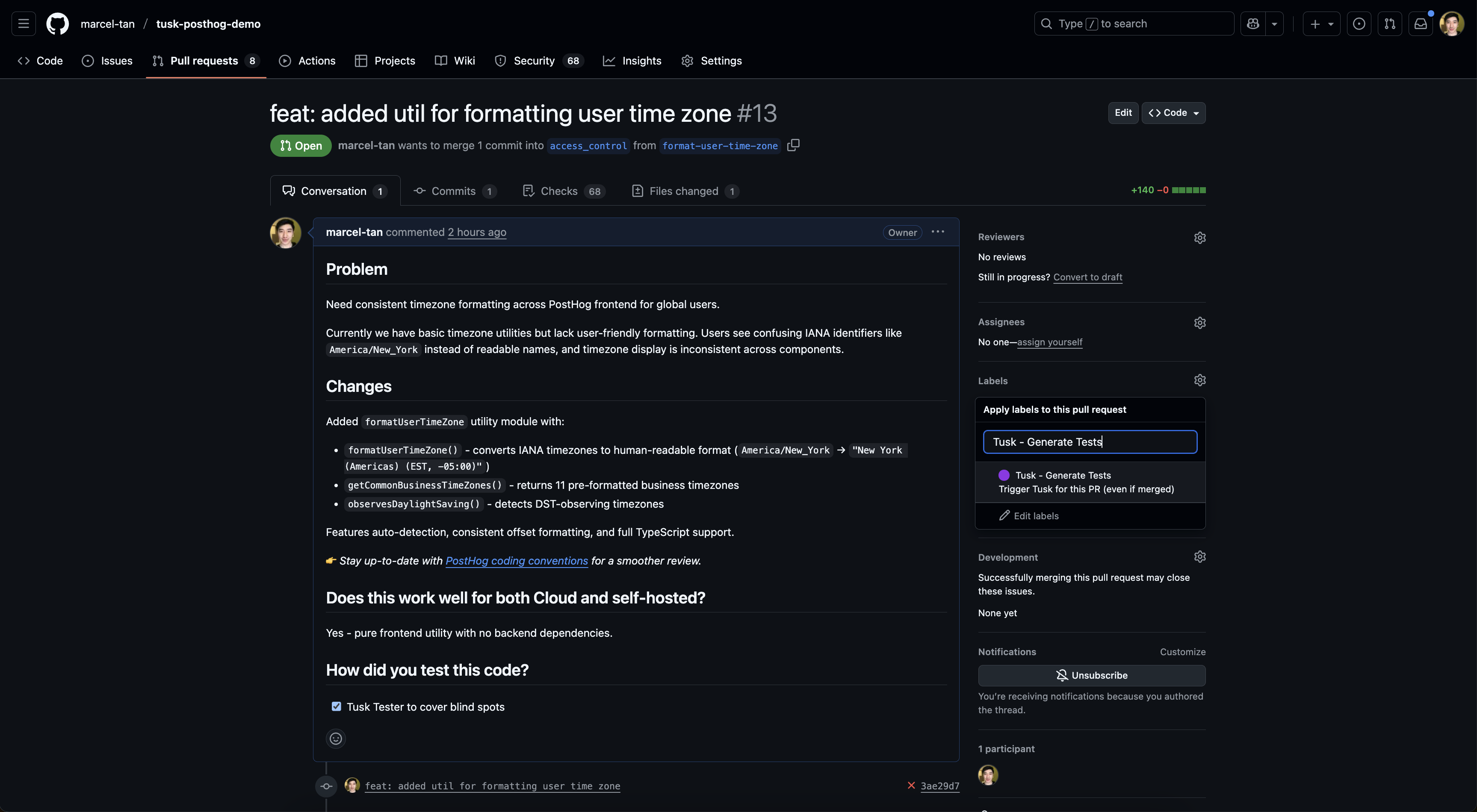
2. **Manual trigger**, which requires you to add the `Tusk - Generate Tests` GitHub/GitLab label to the PR/MR. This label is automatically created when you connect Tusk to your GitHub organization or GitLab group/project.
3. **CoverBot**, a scheduled pipeline that runs daily or weekly and automatically raises a PR/MR with unit tests that help backfill coverage for untested parts of your repo. This is an async workflow that occurs at a fixed interval. [Read more](https://docs.usetusk.ai/automated-tests/coverbot).
For brevity, any mention of "PR" henceforth refers to both GitHub pull requests and GitLab merge requests.
***
## PR Check
### Committing to PR Branch
Software engineer creates a PR with their code changes. Here's an [example PR](https://github.com/marcel-tan/tusk-posthog-demo/pull/13) on a public repo.
## Overview
Tusk generates unit tests for your code in 3 main ways:
1. **PR/MR check**, which is triggered when a PR/MR (draft or otherwise) is raised or a new commit is pushed to the PR/MR's branch. This is a non-blocking check by default, akin to AI code review but with the added benefit of scaling your testing infra. [Read more](https://docs.usetusk.ai/automated-tests/overview).
2. **Manual trigger**, which requires you to add the `Tusk - Generate Tests` GitHub/GitLab label to the PR/MR. This label is automatically created when you connect Tusk to your GitHub organization or GitLab group/project.
3. **CoverBot**, a scheduled pipeline that runs daily or weekly and automatically raises a PR/MR with unit tests that help backfill coverage for untested parts of your repo. This is an async workflow that occurs at a fixed interval. [Read more](https://docs.usetusk.ai/automated-tests/coverbot).
For brevity, any mention of "PR" henceforth refers to both GitHub pull requests and GitLab merge requests.
***
## PR Check
### Committing to PR Branch
Software engineer creates a PR with their code changes. Here's an [example PR](https://github.com/marcel-tan/tusk-posthog-demo/pull/13) on a public repo.
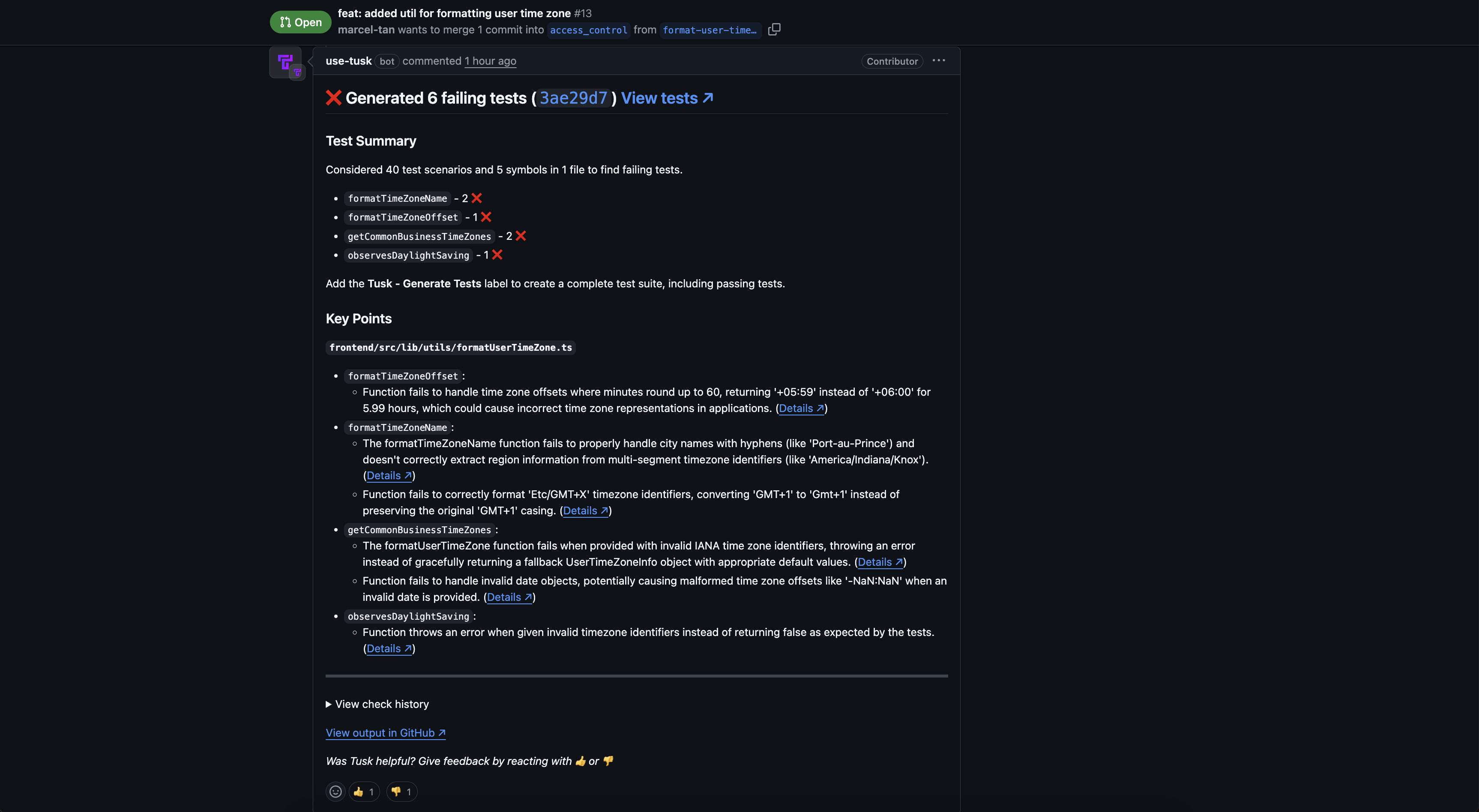
 On PR creation, Tusk takes 8-15 mins to generate, run, and iterate on its unit tests (latency varies depending on PR size and repo complexity). By default, Tusk only surfaces failing tests that are indicative of a potential bug in the code changes.
 On Tusk's completion, engineer clicks on Tusk's PR comment and reviews the test generation output in the Tusk web app.
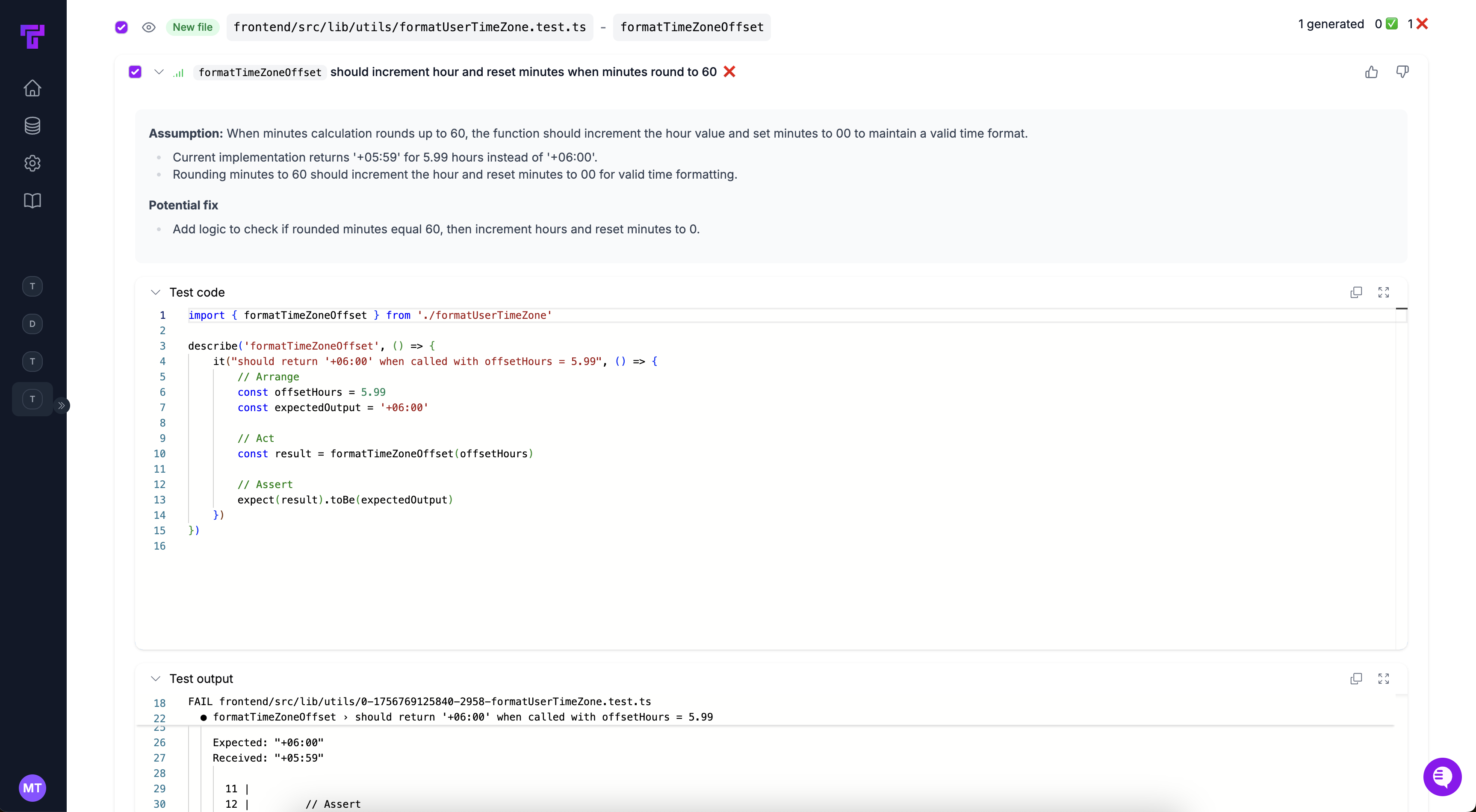 Engineer selects which unit tests they want to commit and clicks **Commit tests** in the Tusk web app.
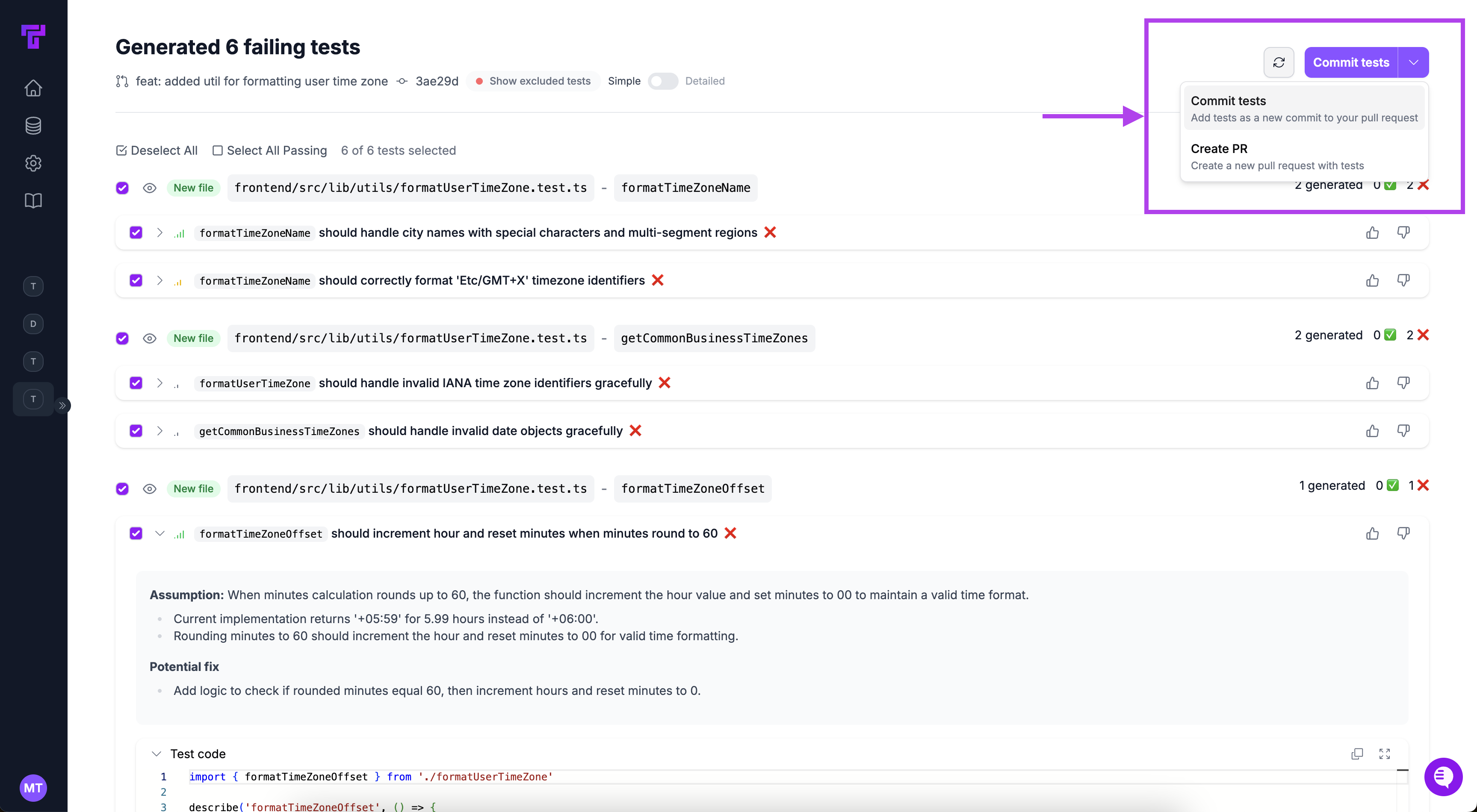 Once you commit Tusk's tests, the agent stops re-running test generation to avoid a loop. If you want Tusk to generate more tests (e.g., after adding new changes), add the **Tusk - Generate Tests** GitHub/GitLab label to the PR/MR.
If there are failing tests, engineer checks out the branch from within their IDE and fixes the bug in their code causing the failing test. Tusk labels failing tests with a `[Tusk] FAILING TEST` comment in the test file for ease of reference.
Engineer re-runs the test file to make sure the failing test now passes, removes the `[Tusk] FAILING TEST` comment, and pushes the fix.
Engineer goes through typical PR review and approval workflow and then merges the PR.
### Creating a Separate PR
Software engineer creates a PR ready for review. Here's an [example PR](https://github.com/marcel-tan/tusk-posthog-demo/pull/6) on a public repo.
On PR creation, Tusk will start its test generation run. Engineer is free to get the PR approved and merged regardless of whether Tusk has completed its run.
Tusk continues generating tests despite the PR being merged. Once completed, Tusk leaves a comment on the PR linking to the test generation output.
Once you commit Tusk's tests, the agent stops re-running test generation to avoid a loop. If you want Tusk to generate more tests (e.g., after adding new changes), add the **Tusk - Generate Tests** GitHub/GitLab label to the PR/MR.
If there are failing tests, engineer checks out the branch from within their IDE and fixes the bug in their code causing the failing test. Tusk labels failing tests with a `[Tusk] FAILING TEST` comment in the test file for ease of reference.
Engineer re-runs the test file to make sure the failing test now passes, removes the `[Tusk] FAILING TEST` comment, and pushes the fix.
Engineer goes through typical PR review and approval workflow and then merges the PR.
### Creating a Separate PR
Software engineer creates a PR ready for review. Here's an [example PR](https://github.com/marcel-tan/tusk-posthog-demo/pull/6) on a public repo.
On PR creation, Tusk will start its test generation run. Engineer is free to get the PR approved and merged regardless of whether Tusk has completed its run.
Tusk continues generating tests despite the PR being merged. Once completed, Tusk leaves a comment on the PR linking to the test generation output.
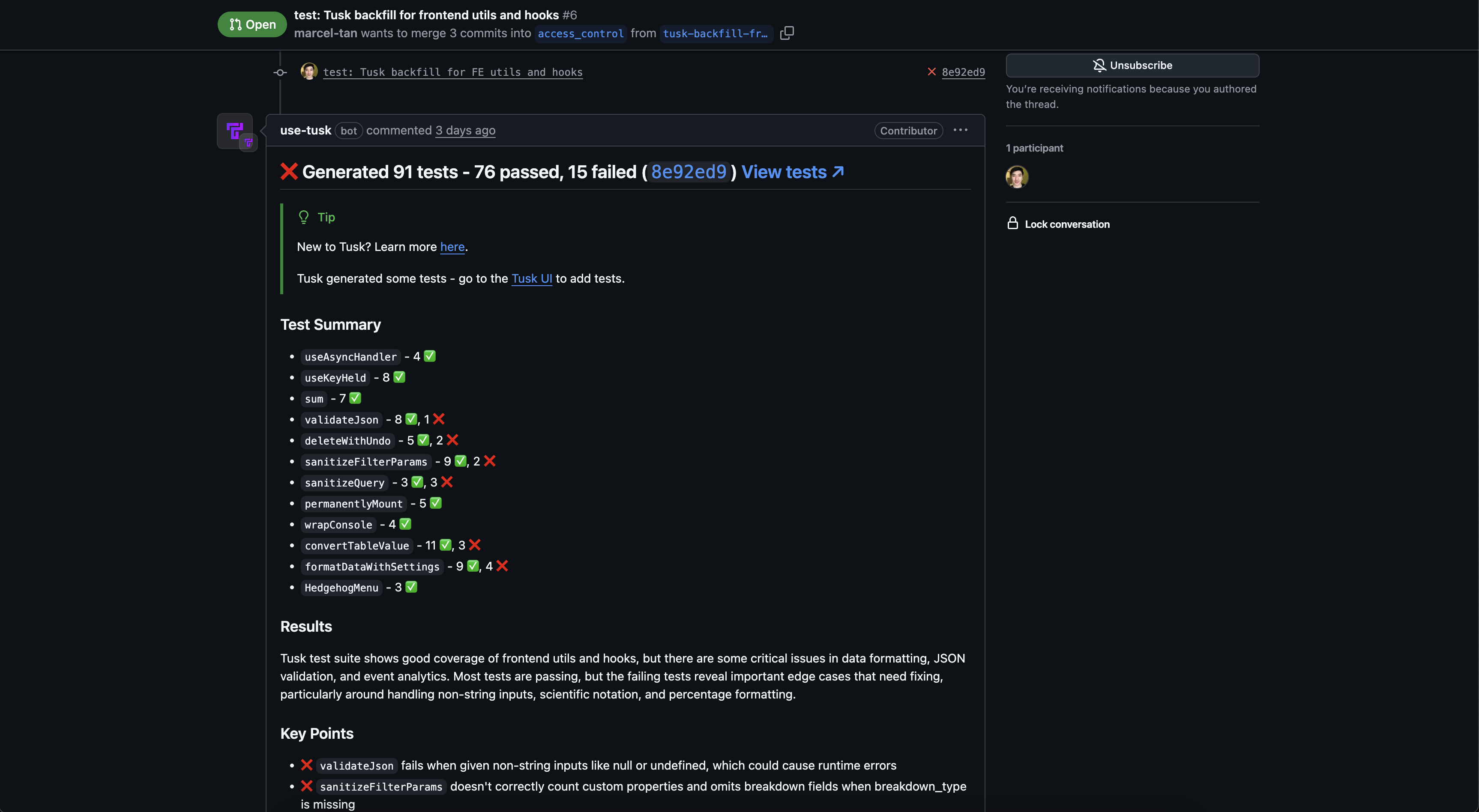 Engineer selects which unit tests they want and clicks **Create PR** in the test generation output page in the Tusk web app. Tusk creates a separate PR containing the selected tests off of the original PR's base branch.
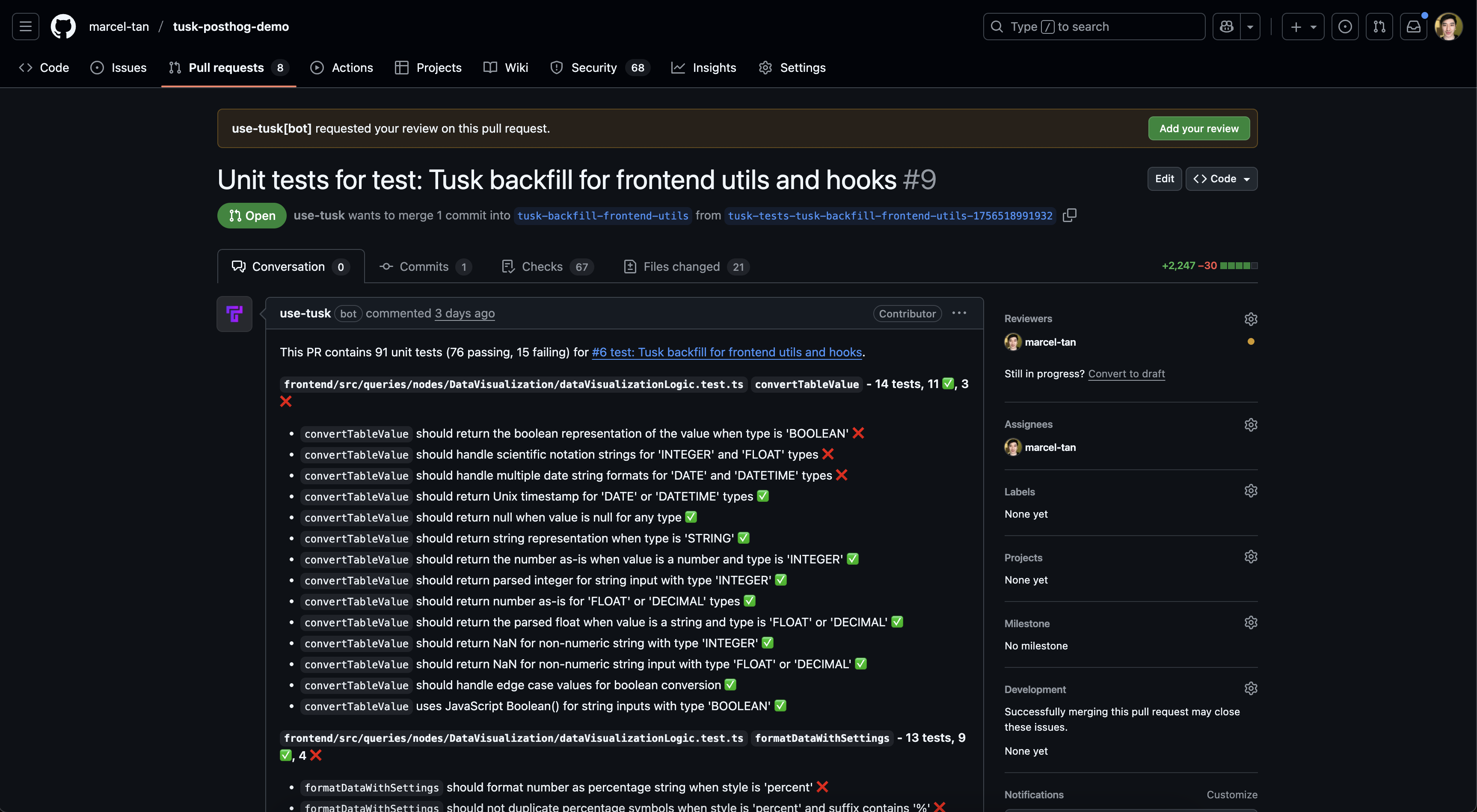 If there are failing tests, engineer goes to the new Tusk PR, pulls down the branch, and fixes the bug causing the failing test locally. Tusk labels failing tests with a `[Tusk] FAILING TEST` comment in the test file for ease of reference.
Engineer re-runs the test file to make sure the failing test now passes, removes the `[Tusk] FAILING TEST` comment, and pushes the fix.
If there are failing tests, engineer goes to the new Tusk PR, pulls down the branch, and fixes the bug causing the failing test locally. Tusk labels failing tests with a `[Tusk] FAILING TEST` comment in the test file for ease of reference.
Engineer re-runs the test file to make sure the failing test now passes, removes the `[Tusk] FAILING TEST` comment, and pushes the fix.
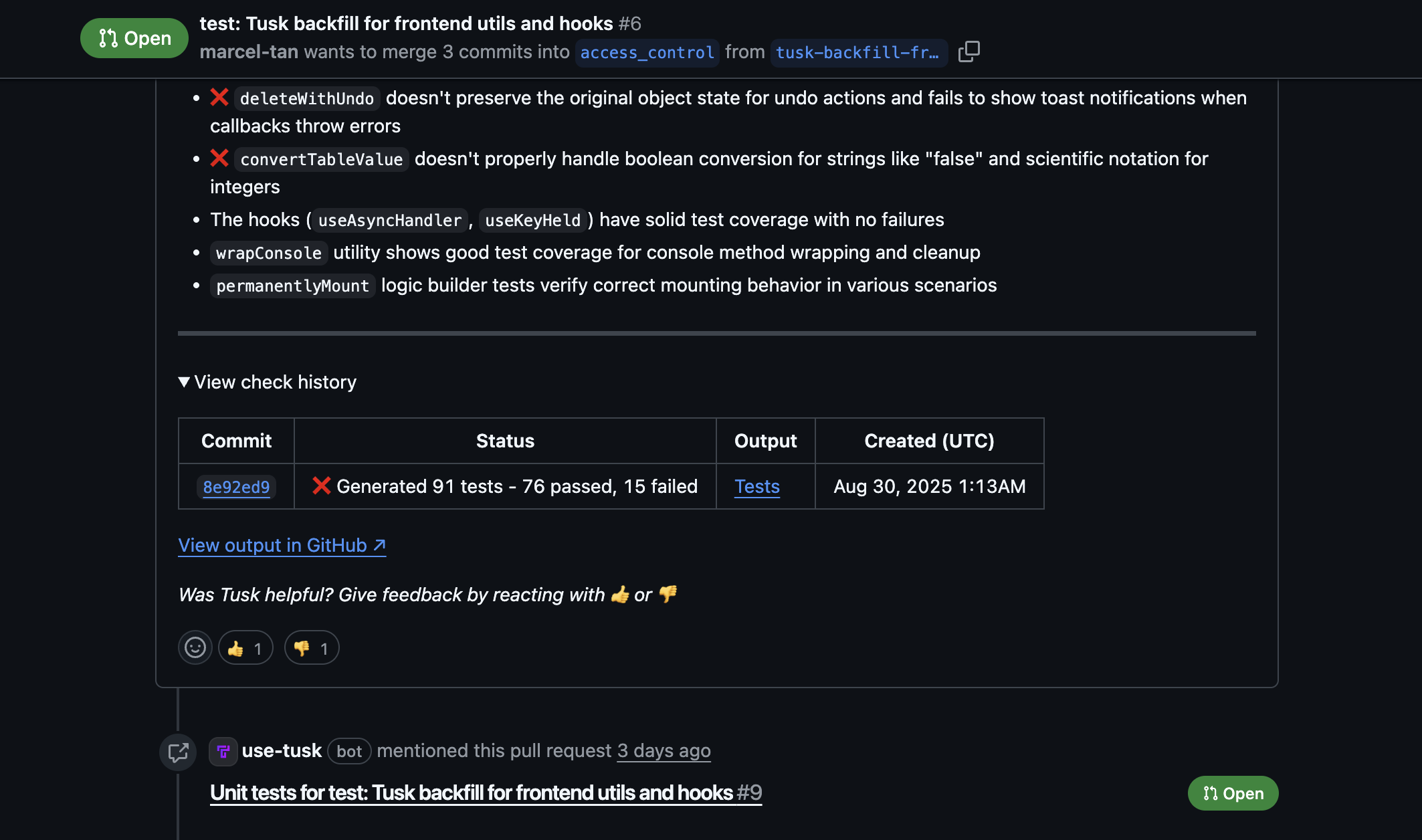 Engineer goes through typical PR review workflow before approving and merging the Tusk PR with the tests.
If the original PR is *not yet merged*, merging the Tusk PR adds a new commit to the original PR's branch. Otherwise, the Tusk PR is merged into the default branch that the original PR was based off of.
***
## Manual Trigger
### Testing an Open PR
Go to **Settings > Seats > Edit preferences** in the Tusk web app.
Toggle on "User preferences" and uncheck the "Run on new commits" setting under Test Check Configuration.
Write code and create a PR once at a good stopping point.
Add the `Tusk - Generate Tests` GitHub/GitLab label to the PR/MR to generate unit tests for your changes.
Engineer goes through typical PR review workflow before approving and merging the Tusk PR with the tests.
If the original PR is *not yet merged*, merging the Tusk PR adds a new commit to the original PR's branch. Otherwise, the Tusk PR is merged into the default branch that the original PR was based off of.
***
## Manual Trigger
### Testing an Open PR
Go to **Settings > Seats > Edit preferences** in the Tusk web app.
Toggle on "User preferences" and uncheck the "Run on new commits" setting under Test Check Configuration.
Write code and create a PR once at a good stopping point.
Add the `Tusk - Generate Tests` GitHub/GitLab label to the PR/MR to generate unit tests for your changes.
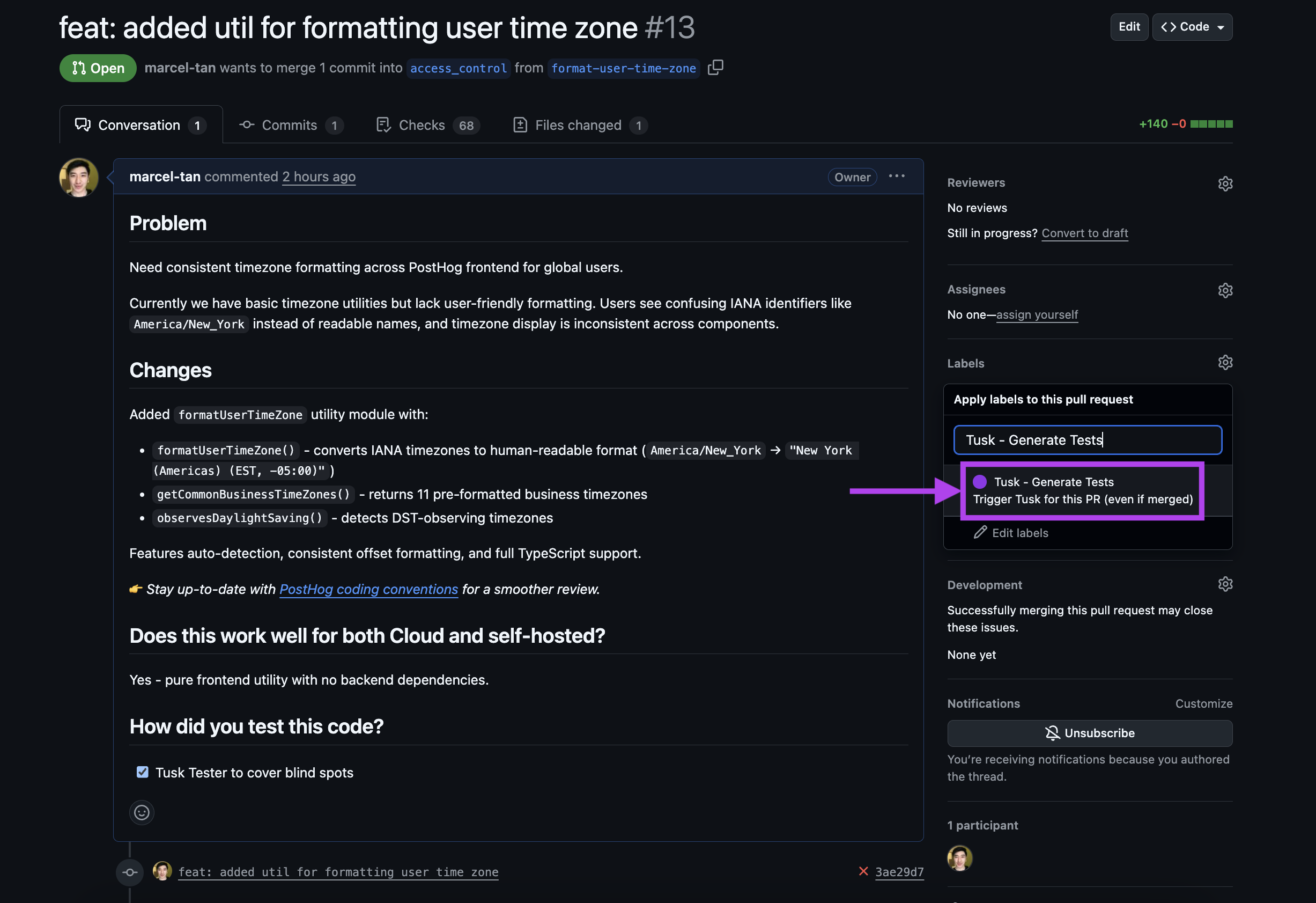 Tusk takes 8-15 mins to generate, run, and iterate on its unit tests (latency varies depending on PR size and repo complexity). On completion, Tusk leaves a comment with the test summary and removes the label on the PR.
Engineer selects which unit tests they want to commit and clicks **Commit tests** in the Tusk web app.
If there are failing tests, engineer pulls down the branch and fixes the bug causing the failing test locally. Tusk labels failing tests with a `[Tusk] FAILING TEST` comment in the test file for ease of reference.
Engineer re-runs the test file to make sure the failing test now passes, removes the `[Tusk] FAILING TEST` comment, and pushes the fix.
Engineer goes through typical PR review and approval workflow and then merges the PR.
### Backfill for Past PR
Engineer goes to a past merged or closed PR to backfill unit tests for. They make sure the changes are **not** outdated.
Engineer adds the `Tusk - Generate Tests` GitHub/GitLab label to the PR/MR to generate unit tests for the code changes.
Tusk takes 8-15 mins to generate, run, and iterate on its unit tests (latency varies depending on PR size and repo complexity). Once completed, Tusk leaves a comment on the merged/closed PR linking to the test generation output and removes the label.
From the test generation output page, engineer selects which unit tests they want and clicks **Create PR**. Tusk creates a separate PR containing the selected tests off of the original PR's base branch.
If there are failing tests, engineer goes to the new PR, pulls down the branch, and fixes the bug causing the failing test locally. Tusk labels failing tests with a `[Tusk] FAILING TEST` comment in the test file for ease of reference.
Engineer re-runs the test file to make sure the failing test now passes, removes the `[Tusk] FAILING TEST` comment, and pushes the fix.
Engineer goes through typical PR review workflow before approving and merging the Tusk PR with the selected tests.
***
## CoverBot
CoverBot runs at its scheduled interval, typically weekly on a Mon or Tue at 9:00am local time.
CoverBot generates unit tests and creates a PR with passing tests for recently modified files with low coverage. Note that chosen files are batched according to similarity. Here's an [example PR](https://github.com/marcel-tan/tusk-posthog-demo/pull/11) on a public repo.
The code owner or default assigned reviewer for CoverBot PRs reviews CoverBot's unit tests to make sure they are valid.
If modifications are needed, reviewer checks out the branch from within their IDE and modifies or removes unit tests as needed. Reviewer re-runs the test file to make sure it executes properly, then pushes the changes to the same branch.
If any potential bugs are detected, reviewer copies Tusk's output from the PR description, creates a ticket, and assigns it to the code owner or themself to resolve.
Reviewer approves and merges the CoverBot PR to increase project coverage.
CoverBot will **not** generate a new PR until the previous PR (for the same test execution environment) is either merged or closed, so being timely about merging the PR helps you avoid missing a scheduled run.
Tusk takes 8-15 mins to generate, run, and iterate on its unit tests (latency varies depending on PR size and repo complexity). On completion, Tusk leaves a comment with the test summary and removes the label on the PR.
Engineer selects which unit tests they want to commit and clicks **Commit tests** in the Tusk web app.
If there are failing tests, engineer pulls down the branch and fixes the bug causing the failing test locally. Tusk labels failing tests with a `[Tusk] FAILING TEST` comment in the test file for ease of reference.
Engineer re-runs the test file to make sure the failing test now passes, removes the `[Tusk] FAILING TEST` comment, and pushes the fix.
Engineer goes through typical PR review and approval workflow and then merges the PR.
### Backfill for Past PR
Engineer goes to a past merged or closed PR to backfill unit tests for. They make sure the changes are **not** outdated.
Engineer adds the `Tusk - Generate Tests` GitHub/GitLab label to the PR/MR to generate unit tests for the code changes.
Tusk takes 8-15 mins to generate, run, and iterate on its unit tests (latency varies depending on PR size and repo complexity). Once completed, Tusk leaves a comment on the merged/closed PR linking to the test generation output and removes the label.
From the test generation output page, engineer selects which unit tests they want and clicks **Create PR**. Tusk creates a separate PR containing the selected tests off of the original PR's base branch.
If there are failing tests, engineer goes to the new PR, pulls down the branch, and fixes the bug causing the failing test locally. Tusk labels failing tests with a `[Tusk] FAILING TEST` comment in the test file for ease of reference.
Engineer re-runs the test file to make sure the failing test now passes, removes the `[Tusk] FAILING TEST` comment, and pushes the fix.
Engineer goes through typical PR review workflow before approving and merging the Tusk PR with the selected tests.
***
## CoverBot
CoverBot runs at its scheduled interval, typically weekly on a Mon or Tue at 9:00am local time.
CoverBot generates unit tests and creates a PR with passing tests for recently modified files with low coverage. Note that chosen files are batched according to similarity. Here's an [example PR](https://github.com/marcel-tan/tusk-posthog-demo/pull/11) on a public repo.
The code owner or default assigned reviewer for CoverBot PRs reviews CoverBot's unit tests to make sure they are valid.
If modifications are needed, reviewer checks out the branch from within their IDE and modifies or removes unit tests as needed. Reviewer re-runs the test file to make sure it executes properly, then pushes the changes to the same branch.
If any potential bugs are detected, reviewer copies Tusk's output from the PR description, creates a ticket, and assigns it to the code owner or themself to resolve.
Reviewer approves and merges the CoverBot PR to increase project coverage.
CoverBot will **not** generate a new PR until the previous PR (for the same test execution environment) is either merged or closed, so being timely about merging the PR helps you avoid missing a scheduled run.