> ## Documentation Index
> Fetch the complete documentation index at: https://docs.usetusk.ai/llms.txt
> Use this file to discover all available pages before exploring further.
# GitHub Workflow
> Allow Tusk to auto-address feedback from automated checks
If you are creating the workflow on your own, please reach out to
[support@usetusk.ai](mailto:support@usetusk.ai) once you've merged the workflow so we can enable the auto-iteration feature
for your agent.
# Overview
Tusk uses a **custom GitHub workflow** for our customers to ensure that any pull request created passes your sanity checks.
Do this by creating a GitHub workflow at `.github/workflows/tusk-sanity-check.yml`. This workflow should:
1. Auto-fix any formatting/lint errors
2. Commit those changes (if any) to the branch
1. This commit message must start with `fix(${{ github.run_id }}):`
3. Run a type check/build step
Tusk will run this workflow automatically after every commit it creates. If there’s an error in any of the above, it will get provided back to Tusk as feedback and Tusk will iterate on it automatically.
# Example workflow
Here’s an example workflow for a company that uses Node.js, has a frontend app and backend app, and has pre-existing lint/build commands.
```yaml theme={null}
name: Tusk Sanity Check
on:
workflow_dispatch: # Use workflow_dispatch because Tusk will trigger this on its own
inputs:
taskId:
description: "Tusk Task ID"
required: true
runType:
description: "Tusk Run Type"
required: true
runId:
description: "Tusk Run ID"
required: true
jobs:
sanity_check:
runs-on: ubuntu-latest
steps:
- name: Log inputs
run: |
echo "Tusk Task ID: ${{ github.event.inputs.taskId }}"
echo "Tusk Run Type: ${{ github.event.inputs.runType }}"
echo "Tusk Run ID: ${{ github.event.inputs.runId }}"
echo "Current Branch: ${{ github.ref }}"
echo "Repository default branch: ${{ github.event.repository.default_branch }}"
- uses: actions/checkout@v4
with:
ref: ${{ github.ref }}
# We use paths-filter to determine what directories were modified.
- uses: dorny/paths-filter@v3
id: filter
with:
base: ${{ github.event.repository.default_branch }} # or provide branch name, e.g. 'main'
# Space delimited list usable as command-line argument list in Linux shell. If needed, it uses single or double quotes to wrap filename with unsafe characters.
list-files: "shell"
# Using added|modified so we don't run prettier/eslint on deleted files
filters: |
frontend:
- added|modified: 'frontend/**'
backend:
- added|modified: 'backend/**'
- name: Set Node.js v18.16
uses: actions/setup-node@v3
with:
node-version: 18.16
- name: (Frontend) Install dependencies
if: steps.filter.outputs.frontend == 'true' # You can use the output of paths-filter to decide which steps to run
run: npm ci
working-directory: ./frontend
- name: (Backend) Install dependencies
if: steps.filter.outputs.backend == 'true'
run: npm ci
working-directory: ./backend
- name: (Frontend) Lint fix
if: steps.filter.outputs.frontend == 'true'
run: npm run lint:fix # This lint:fix commands runs prettier and eslint --fix
working-directory: ./frontend
- name: (Backend) Lint fix
if: steps.filter.outputs.backend == 'true'
run: npm run lint:fix # This lint:fix commands runs prettier and eslint --fix
working-directory: ./backend
# You must include this step after running all auto-fixing steps
- uses: stefanzweifel/git-auto-commit-action@v5
with:
commit_message: "fix(${{ github.run_id }}): auto linting" # The commit message MUST start with "fix(${{ github.run_id }}):"
skip_fetch: true
skip_checkout: true
- name: (Frontend) Check build
if: steps.filter.outputs.frontend == 'true'
run: npm run build:check
working-directory: ./frontend
- name: (Backend) Check build
if: steps.filter.outputs.backend == 'true'
run: npm run build
working-directory: ./backend
```
# Tips and Tricks
## Running lint/formatting steps
**Make sure that you auto-fix as many errors as possible.** This results in higher quality code because Tusk doesn’t have to “think” about issues that are auto-fixed.
If you don’t use something like `lint-staged` (see below section if you do), you may only want to auto-lint or auto-format files that are modified. You can use the output of `dorny/paths-filter` to do this. Some notes:
* We need to strip out the sub-directory of the file so it becomes the local path (`paths-filter` returns the full file path)
* `"${file#frontend/}"` removes `frontend/` from `file` (e.g. `frontend/app.tsx` becomes `app.tsx`)
```yaml theme={null}
- uses: dorny/paths-filter@v3
id: filter
with:
base: ${{ github.event.repository.default_branch }} # or provide branch name, e.g. 'main'
# Space delimited list usable as command-line argument list in Linux shell. If needed, it uses single or double quotes to wrap filename with unsafe characters.
list-files: "shell"
filters: |
frontend:
- 'frontend/**'
backend:
- 'backend/**'
- name: (frontend) Run prettier
if: steps.filter.outputs.frontend == 'true'
working-directory: frontend
run: |
for file in ${{ steps.filter.outputs.frontend_files }}; do
npx prettier --write "${file#frontend/}"
done
```
## Using lint-staged
If you already use lint-staged, you need to modify the `checkout` step to include `fetch-depth`
```yaml theme={null}
- uses: actions/checkout@v4
with:
ref: ${{ github.ref }}
fetch-depth: 40
```
* Set `fetch-depth: 40`. 40 commits should be more than enough for all the new Tusk commits on that branch. `lint-staged` will use these commits to determine the files that are changed.
* Pass in a diff command to `lint-staged` (e.g. `npx lint-staged --diff=origin/master` or `npx lint-staged --diff=origin/${{ github.event.repository.default_branch }}`
## Using dorny/paths-filter
Use [dorny/paths-filter](https://github.com/dorny/paths-filter) to figure out the sub-directories that are modified (the example below is for a repo with `frontend` and `backend`).
```yaml theme={null}
- uses: dorny/paths-filter@v3
id: filter
with:
base: ${{ github.event.repository.default_branch }} # or provide branch name, e.g. 'main'
# Space delimited list usable as command-line argument list in Linux shell. If needed, it uses single or double quotes to wrap filename with unsafe characters.
list-files: "shell"
filters: |
frontend:
- 'frontend/**'
backend:
- 'backend/**'
```
* You need to set the base branch, for most repos this can just be the default branch but if you’ve asked Tusk to use a different default branch for Tusk make sure to specify that.
* After this, you can then use something like `if: steps.filter.outputs.frontend == 'true'` to determine whether to run certain future steps.
* This will also list the files/that are modified as part of the output (in case we need to pass to any lint/buld commands). You can use this like `${{ steps.filter.outputs.frontend_files }}`.
## Committing any auto changes
We use the [stefanzweifel/git-auto-commit-action](https://github.com/stefanzweifel/git-auto-commit-action) to auto-commit any changes that are made to the branch based off of your formatting/lint steps.
```yaml theme={null}
- uses: stefanzweifel/git-auto-commit-action@v5
with:
commit_message: "fix(${{ github.run_id }}): auto linting"
skip_fetch: true
skip_checkout: true
```
## Testing your workflow
* Make sure that your workflow is merged into your main branch on GitHub (if it doesn’t exist there you won’t be able to manually dispatch it to test it)
* Once your workflow is merged on the main branch, if you test the workflow on a different branch it will use the workflow file on the branch you are testing it on. This allows you to test changes to the workflow without merging to main.
* We also recommend testing a branch that has a change in it that should be auto-fixed based on your workflow, and ensuring that this workflow auto-fixes it.
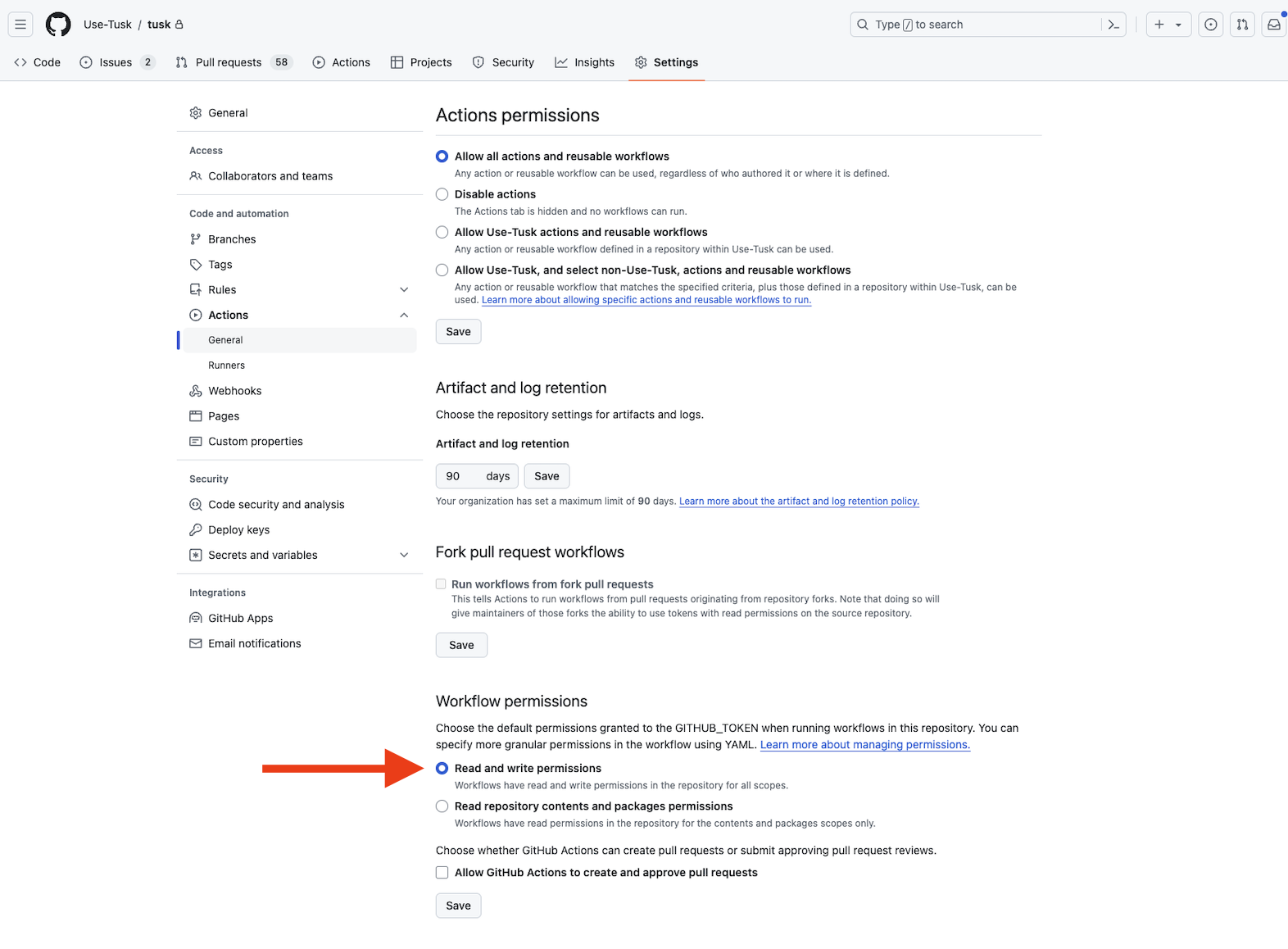
* Make sure your “Workflow permissions” are set to “Read and write permissions”